Sunday, March 7, 2010

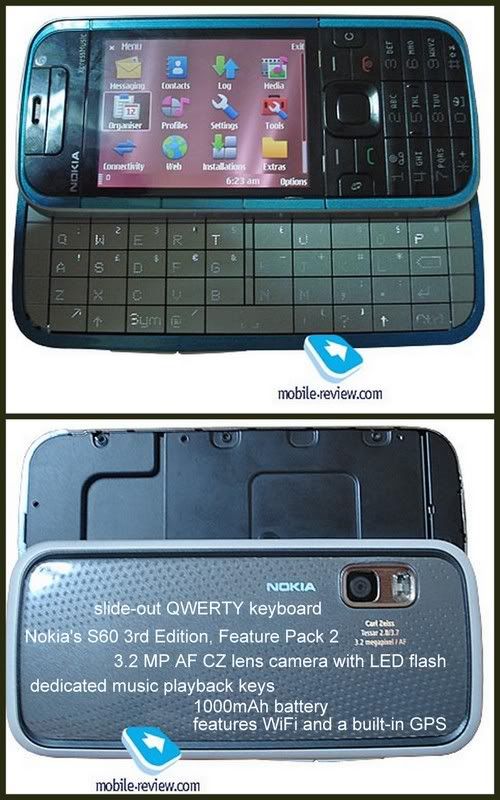
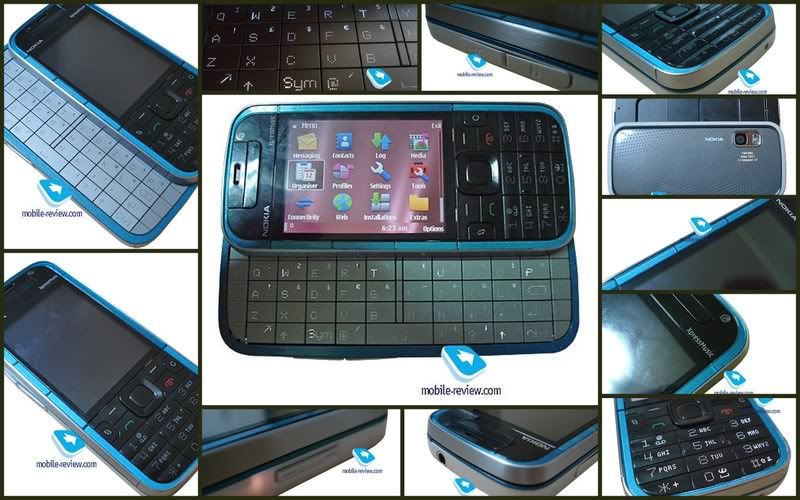
Nokia 5630 XpressMusic


General 2G Network GSM 850 / 900 / 1800 / 1900
3G Network HSDPA 2100 / 900
Announced 2009, February
Status Available. Released 2009, June
Size Dimensions 112 x 46 x 12 mm
Weight 83 g
Display Type TFT, 16M colors
Size 240 x 320 pixels, 2.2 inches
Sound Alert types Vibration; Downloadable polyphonic, MP3 ringtones
Speakerphone Yes
- 3.5 mm audio jack
- Dedicated music keys
Memory Phonebook Practically unlimited entries and fields, Photocall
Call records Detailed, max 30 days
Internal 60 MB storage, 128 MB RAM
Card slot microSD, up to 16GB, 4GB included, buy memory
Data GPRS Class 32
EDGE Class 32
3G HSDPA, 10.2 Mbps; HSUPA, 2 Mbps
WLAN Wi-Fi 802.11 b/g, UPnP technology
Bluetooth Yes, v2.0 with A2DP
Infrared port No
USB Yes, v2.0 microUSB
Camera Primary 3.15 MP, 2048x1536 pixels, enhanced fixed focus, LED flash
Video Yes
Secondary VGA videocall camera
Features OS Symbian OS, S60 rel. 3.2
CPU ARM 11 600 MHz processor
Messaging SMS, MMS, Email
Browser WAP 2.0/xHTML
Radio Stereo FM radio with RDS
Games Yes, N-gage + downloadable
Colors Red on black, Blue on grey, Chrome on grey
GPS No
Java Yes, MIDP 2.1
- WMV/RV/MP4/3GP video player
- MP3/WMA/WAV/RA/AAC/M4A music player
- Voice memo
- T9
Battery Standard battery, Li-Ion 860 mAh (BL-4CT)
Stand-by Up to 400 h (2G) / 408 h (3G)
Talk time Up to 7 h (2G) / 4 h (3G)
Music play Up to 25 h
Misc SAR US 1.17 W/kg (head) 0.56 W/kg (body)
SAR EU 1.17 W/kg (head)

Saturday, March 6, 2010

Nokia OVI Maps


Nokia OVI Maps - Free Navigation Edition

Requirements & Recommendations
- Uninstall any previous version Nokia Maps / Nokia OVI Maps.
- Delete the entire existing CITIES folder from memory card.
- Deletion of above folder is because this new version not compatible with old map structure.

Official Downloads

Download Nokia Maps: http://nds1.nokia.com/PRODUCT_METADATA_0/E...60_5.0.Nocs.sis
Download Map Loader: http://nds1.nokia.com/files/support/global...erSetup_ENU.exe

Alternate Downloads

Download Nokia Maps Offline Version
- http://www.4shared.com/file/228114705/87a2...a_OVI_Maps.html

Address Finding & Detailing Tips

Offline finding tips, make sure use rough names, eg. if u wanna find No. 1, Jalan Timun 24/F, Seksyen 24, Shah Alam, Selangor Darul Ehsan just use the keyword Jalan Timun 24 Shah Alam and the trick will work by finding nearest exact location.

For Nokia OVI Maps - http://img192.imageshack.us/img192/1208/ma...aovimapsadd.jpg

Migrating Handphone Device

1. Prepare the fresh installation either via Nokia OVI Maps source or alternate source.
2. Copy out the entire CITIES folder from memory card.
3. Do a fresh installation and configuration of the new Nokia OVI maps.
4. Connect device via Mass Storage mode.
5. Delete the entire new CITIES folder from memory card.
6. Copy the backed up old CITIES folder to memory card.
7. Done !

Address Finding Issue After Installation

It seems to be a small issue, where by Nokia might wants the user to go online search for the first time on the Nokia Maps before subsequent searches are performed offline mode. This may due to device authentication data sent online to Nokia for log purpose. Once the first time online search ends, close Nokia OVI Maps and do an offline search. It works !

Nokia OVI Maps Online & Offline Map Searching Issue

1. Setup your WiFi setting.
2. Verify the WiFi functionality (browse some web page).
3. Set the WiFi as 1st priority inside the destination (internet) setting.
4. Set the WiFi as the default access point (for the internet).
5. Delete the WAP / MMS / STREAMING settings and left the 3G Internet (as 2nd priority inside the internet setting).
6. Edit the 3G internet setting and change the "password prompt" to YES.
7. Load up the maps loader.
8. Click on the delete maps from storage.
9. Reload in the maps (at least the malaysia map must be selected).
10. Load as well the voice guidance file.
11. Wait for all the downloading and uploading finished.
12. Run Location and disable the agps and network under positioning setting.
13. Run the OVI maps.
14. When the 3G internet prompt up select cancel (do not connect) (if it still pop up, suppose wont because we already disable A-GPS and network in Location setting).
15. Go to setting and change the internet to online.
16. Select appropiate voice guidance file.
17. Go outside where more satelite can be search.
18. Now go to my location and wait for the satelite to get a fix (might be take long since no agps)
19. Make sure the red dot are "IN MALAYSIA".
20. Change maps mode as SATELITE view to try the WiFi can download the satelite image (to ensure WiFi is working).
21. Once confirm WiFi working switch back to maps view.
22. Walk around and you will see the GPS is working already (since it already lock, red dot will turn SOLID RED and satellite bar should be green).

The most useful for the 3G internet password prompt when agps and network positioning enable:
1. Select YES during the password prompt you will have A-GPS (fast lock with charges).
2. Select CANCEL during the password prompt you will have full I-GPS (slow lock but FOC).

Steps 18 and 19 are needed because sometime during the first time OVI maps run it will set it "previous' location as some where maybe not within Malaysia and if this happen and you dont have those location maps downloaded in the database then it will direct download from the internet and who know which access point it gonna use (if it use 3G internet then you will lost lots of phone credits for those huge maps data), confirm this if you dont have the maps data install it will direct download the file.

Below is a screenshot shows, full OFFLINE guide, see the GPS INTERNET connection is striked out:


thanks to lowyat.net

Voice Copy Guidance


Friday, March 5, 2010

How to Install Garmin XT on Nokia 5800


It turns out, it is pretty tough considering my lack of expertise when it comes to Symbian OS phones. I spent 3 days experimenting all possibilities to make it work on my phone. Since it took a lot of my time, I’m going to save yours by teaching you.

Before you do anything, Download the file (80 mb ++) and read all the instructions before hand. It’ll help you to visualize the process.

Download file contains

  • GarminMobileXTforSymbianS603rdEdition_50040.exe
  • GarminMobileXTFreeBasemap_4xxxx.exe
  • GarminMobileXTSupportFiles_4xxxx.exe
  • gmapsupp.img (Malaysian Map, with DUKE highway)
  • garmin_kgen.exe
  • 5800_manual.pdf
  • GarminMobile20_GarminMobileXTOwnersManual.pdf

Note: You can skip part 1.

1. Setting up Apparatus, The Nokia 5800

  1. Back up all data using PC Suite (go to Nokia website).
  2. Soft reset by pressing *#7370#. Should take about 2-3 mins and you lose all your data (except on memory card). But don’t worry, you have back up remember?
  3. On your Nokia 5800, go to Application > Location > Positioning > Positioning Methods. Enable “Assisted GPS” and “Integrated GPS” ONLY. This will ensure you don’t get charge using WAP or 3G network for Internet.
  4. Go to Application > Location > GPS Data > Position > Options > Satellite status. This will show the satellite signals you’re receiving. Be sure you are outdoor in an open area. Balcony doesn’t work well, believe me I’ve tried. Once you’ve got AT LEAST 4 satellite signal, go back indoor, you don’t want people to think you’re crazy, waving your phone around.
  5. Now you’re ready for GarminXT.

2. Installing GarminXT on Nokia 5800.

  1. Once you’ve downloaded, unzip the files to someplace accessible preferably on your desktop. If you haven’t, please download it.
  2. Connect your phone via USB and select ‘Mass storage mode’.
  3. From you PC, double click “GarminMobileXTforSymbianS603rdEdition_50040.exe” to install and wait.
  4. Double click “GarminMobileXTFreeBasemap_4xxxx.exe” to install. Wait..
  5. Double click “GarminMobileXTSupportFiles_4xxxx.exe” to install.
  6. Remove USB connection between PC and phone. When prompted ‘Launch GarminXT’ do not click Yes, just Cancel.
  7. From your phone, go to Menu > Settings > Application Manager > Installation files. There should be GarminXT.sis file. Install it.

3. Cracking GarminXT on Nokia 5800.

  1. Tell yourself and say “Yes, I’m a cheapskate”.
  2. Run GarminXT from your phone at Menu > Application > Garmin. It will prompt you with some settings. Choose your preferable.
  3. Select “Use other device” when it prompts you to buy or trial. You will get a screen, “Where To?” and “View map”
  4. In GarminXT, go to Tools > Settings > About. Jot down “Card ID”, you will need it. Exit GarminXT
  5. On your PC, run “garmin_kgen.exe” and enter the “Card ID” from previous steps.
  6. Generate it and you will get a string of codes. Copy the codes to Notepad and save it as “sw.unl”. *Be sure you don’t save it as sw.unl.txt”*
  7. Connect your phone to PC and select “Mass storage mode”.
  8. Copy “sw.unl” to Garmin folder. Usually located at E:/Garmin.
  9. Copy “gmapsupp.img” from downloaded file to Garmin folder. “gmapsupp.img” is the Malaysian map.
  10. Disconnect your phone from PC.

4. Restore your Nokia 5800

  1. Reconnect your phone via PC Suite.
  2. Restore your settings through back up.

5. Setting up GarminXT on Nokia 5800

  1. You don’t need your PC anymore. Shut down and conserve energy.
  2. Run GarminXT on your phone.
  3. Go to Tools > Settings > System > Remote GPS. Change to “Use Attached GPS” by disabling the “Bluetooth GPS”.
  4. Go to Tools > Manage My Data > Map Sets > MapSource. Make sure all maps are enabled.

6. Toying GarminXT on Nokia 5800.

  1. Switch off your fans and lights. Go out.
  2. Run GarminXT, (duh!).
  3. Select “View Map” and wait for a while. The satellite will find you. It took me 5 mins or so. Just have patience and faith.
  4. Now you’ll see where you are.
  5. Go back and select “Where To?”. If you’re at home and wants GarminXT to store you current location as home, then select “Home”
  6. “Where To?” is rather confusing. I usually use “Where To?” > Point of interest. There’s lots of shopping malls, hospitals, banks, ATM machines etc. from there, you’d know where to go.
  7. Pat yourself and say “Well done”. The rest is up to you.

Note: I will NOT be providing support. If it doesn’t work for you, you can leave a comment and hope someone will rescue you. Google it!

Monday, March 1, 2010

Nokia 5730 XM, with sliding QWERTY (Nokia)


The only reason why they have thrown the Nokia 5730 into their music-minded line-up is that Nokia are trying to sell the same phone and form-factor in to two different flavors so as to win as big a share as possible.

In fact, it wouldn’t be a mistake to say that they are forging a new segment of side-sliders with thumbboards, instead of assessing every Nokia-branded phone of this kind separately.

While the Nokia 5730 won’t face any sort of direct competition, this fact alone doesn’t guarantee it will be sell in droves. In fact, its predecessor, the Nokia 5320 didn’t have any rivals either, but it never became a particularly popular offering.

On top of that, the Nokia 5800 XpressMusic will be hard to compete with, given that they will be only 60 Euro away from each other price-wise. That’s why the 5730 XpressMusic’s main goal is to pad Nokia’s portfolio and maybe generate some sales, but that’s about it.

The 5730 XpressMusic’s image quality is little to no different from that of the Nokia N78

Its sales will kick off in April at the price-point of around 220 Euro, which makes it a viable option for those who are in the market for a cheap QWERTY-enabled smartphone. But, again, it’s still a niche product, so don’t expect any breakthroughs from it.

P.S. Later this week you’ll see the official announcement of this phone – probably on Wednesday. Don’t forget to check back for our world’s first review of the Nokia 5730 XpressMusic!

Display : 2" 320x240 16mil colors.


Nokia 5230, Entry Level Touchscreen Phone


The Folks at Nokia Conversation was once again first with unveiling another Nokia touchscreen phone. Heres the Nokia 5230 Press release:

Nokia has just popped open its paint pot and pulled out the new Nokia 5230 in a range of custom colours. The latest handset to join the touchscreen fold, the Nokia 5230 has been designed to serve up slick on-the-go entertainment, location-based services and act as an easy pocket portal for social networking at low cost. Read on for more details and get a close-up look at the 5230 in our photo gallery.

Brandishing a 3.2-inch widescreen touch display with full-screen QWERTY keyboard and handwriting recognition, the Nokia 5230 is geared up to enable you to rattle out messages at speed. Paired with speedy HSDPA connectivity, this means staying in the loop and keeping your Facebook and Twitter streams promises to be a no-wait affair. Ovi Store is nestled neatly on the homescreen from the moment you switch on the device, ensuring you can get instant anywhere access to quality bite-size apps.

Music is its first love though, with the 5230 bringing 33 hours of playback time (long battery life was recently voted the most important feature in a music phone by you guys - so we’re stoked to see that), a 3.5mm headphone jack and memory expandable up to 16GB via a microSD card. Two versions of the phone will launch - a standard device costing 149 Euros, and in some select areas a Comes With Music version will be available for 259 Euros for those keen on all-you-can-eat downloads.

Jo Harlow is Vice President at Nokia, and had this to say about today’s news of the upcoming 5230:

“Competitively priced at 149 Euros, we believe the Nokia 5230 is an unbeatable offer for many new customers who aspire a device that stars in music, mingles with social networks from Facebook to MySpace, navigates you to where it happens, when it happens, and comes in array of dazzling colors”

Other features include assisted-GPS with Ovi Maps, Nokia’s new Contacts bar on the homescreen, a 2 megapixel camera and Bluetooth 2.0.

FULL SPECIFICATION

Physical, Power and Memory
Size

* Form: Classic with touchscreen
* Dimensions: 111 x 51.7 x 14.5/15.5 mm
* Weight: 113 g (without stylus)
* Weight: 115 g (with stylus)
* Volume: 78 cc (without stylus) / 83 cc (with stylus)
* Responsive touchscreen with tactile feedback
* Accelerometer for auto-rotate
* Proximity sensor to save power and prevent inadvertent touches


Display and 3D

* Size: 3.2"
* Resolution: 640 x 360 pixels (nHD) with 16:9 picture
* Up to 16.7 million colours
* Full touchscreen display


Keys and input method

* Touchscreen
* Dedicated keys for camera, volume, power, send & end, and application launch (menu), plus the media bar touch key for accessing music, gallery, share online, video centre and web browser
* Homescreen music plug-in for pause/play, forward, back
* Voice commands


Colours and covers

* Available in-box colours:
- White/Red
- White/Dark Silver
- White/Pink
- White/Yellow
- White/Blue
- Black/Red
- Black/Dark Silver
* Changeable colour battery covers


Connectors

* Micro-USB connector, USB 2.0 high speed
* 3.5 mm Nokia AV connector


Memory

* microSD memory card slot, with hot swap max. 16 GB
* 70 MB internal dynamic memory


Power

* BL-5J 1320 mAh Li-Ion standard battery
* Talk time (maximum)
- GSM 7 h
- WCDMA 4 h 18 min
* Standby time (maximum)
- GSM up to 438 h
- WCDMA up to 458 h
* Video playback time (maximum): Mpeg-4 4.6hours, nHD 3 hours
* Music playback time (maximum): 33 h

Communication & Navigation
Operating frequency

* Dual band 900/2100 WCDMA and 850/1900 WCDMA
* GSM/EDGE 850/900/1800/1900
* Automatic switching between GSM bands
* Flight mode


Data network

* CSD
* HSCSD
* GPRS/EGPRS Class B, multislot class 32, maximum speed 177/296kbps (DL/UL)
* EDGE class B, multislot class 32, maximum speed 177/296 kbps (DL/UL)
* WCDMA 2100, maximum speed PS 384/384 kbps (UL/DL),
CS 64 kbps
* HSDPA, cat. 6, maximum speed 3.6 Mbps (DL)
* TCP/IP support


Local connectivity and synchronisation

* Bluetooth version 2.0
- Bluetooth profiles: A2DP, AVRCP
* MTP (Mobile Transfer Protocol) support
* Direct printing to compatible picture printers
* Support for PC synchronisation with Nokia Ovi Suite


Service

* Speaker-independent name dialling (SIND)


Call features

* Integrated hands-free speakerphone
* Number screening for messaging and calls
* Automatic answer with headset or car kit
* Any key answer
* Call waiting, call hold, call divert
* Call timer
* Logging of dialled, received and missed calls
* Automatic redial
* Speed dialling
* Voice dialling: speaker independent dialling and voice commands (SIND)
* Fixed dialling number support
* Vibrating alert (internal), also with tactile feedback
* Side volume keys
* Mute/unmute
* Contacts bar for 20 contacts with images and communication history (SMS, email, web feeds)
* Talking ring tones
* Conference calling with up to 6 participants


Messaging

* SMS
* Multiple SMS deletion
* MMS version 1.3, message size up to 600 kb
* Automatic resizing of images for MMS
* Nokia Xpress audio messaging
* Common inbox for SMS and MMS messages
* Number screening for messaging
* Distribution lists for messaging
* Cell broadcast


E-mail

* Supported protocols: IMAP, POP, SMTP
* Support for e-mail attachments
* OMA e-mail notification support
* Mail for Exchange 2008 preinstalled


Web browsing

* Supported markup languages: HTML, XHTML, WML
* Supported protocols: HTTP, WAP, JavaScript
* TCP/IP support
* OSS browser
* Nokia Mobile Search


GPS and navigation

* Integrated A-GPS
* Ovi Maps 3.0 application


Image & Sound
Photography

* 2 megapixel camera
* Image formats: JPEG
* CMOS sensor
* 3x digital zoom
* White balance modes: automatic, sunny, cloudy, incandescent, fluorescent
* Center weighted auto exposure; exposure compensation: +2 ~ -2EV at 0.5 step
* Colour tone modes: normal, sepia, black & white, vivid, negative
* Dedicated camera key
* Landscape (horizontal) orientation
* Photo editor on device


Video

* Main camera
- Video recording at up to 640 x 480 pixels and up to 30 fps (TV high quality), up to 640 x 352 pixels and up to 30 fps (widescreen quality), up to 320 x 240 pixels and up to 30 fps/15 fps (email high/normal quality), up to 176 x 144 and up to 15 fps (sharing quality)
- Up to 4x digital zoom
* Video recording file formats: .mp4, .3gp
* Audio recording formats: WAV (normal), AMR (MMS), AAC/MP4 (high quality)
* Video white balance modes: automatic, sunny, cloudy, incandescent, fluorescent
* Scene modes: automatic, night
* Colour tone modes: normal, sepia, black & white, vivid, negative
* Clip length (maximum): 1 h 30 min (high or normal quality). Dependable on available memory
* RealPlayer
* Video playback file formats: MPEG4-SP playback 30fps VGA, MPEG4-AVC playback 30fps QVGA, WMV9 playback 30fps QVGA, MPEG4-SP playback 30 fps nHD
* Video streaming: 3GPP and CIF
* Landscape mode video playback
* Video ring tones
* Video editor on device
* Video Centre service supported: download and stream video content, WMV support, video feeds


Music and audio playback

* Music playback file formats: MP3, MP4, AAC, eAAC+, WMA
* Dedicated music keys
* FM radio
* 3.5 mm stereo headphone plug
* 2.5 mm Nokia AV connector
* Nokia Music
* Nokia Music Store support
* Nokia Podcasting support
* Ring tones: mp3, aac, 64-tone polyphonic (64 built-in tones)
* Integrated speaker


Voice and audio recording

* Voice commands
* Voice dialling


Personalisation: profiles, themes, ring tones

* Ring tones: 3D, 64-tone polyphonic, mp3 and video ring tones
* Video ring tone


+ Nokia's Aeon like touchscreen phone leaked in a, 'Echelon Conspiracy' Trailer With Superb (Nokia)

It is well known fact that Nokia likes viral marketing and stealth-like product placements in movies and music videos and TV shows. Company's product placements that we have covered so far incloudes Nokia N81 which was spotted in Alicia Key’s music video, SuperNova made an appearance in Fall Out Boy's I Don’t Care video while the Nokia N96 plays leading role in Katy Perry’s 'Hot N Cold' clip!

Nokia 5800 is king of them all, one of the most advertised Nokia's product ever appeared in the Batman: The Dark Knight movie, latest Britney’s 'Womanizer' video clip, Christina Aguilera's 'Keeps Gettin' Better' music clip, Pussycat Dolls' Jai Ho spot and the last apperance was in the very popular Flo Rida's video spot for Right Round single.

Now Nokia goes one step further as their mysterious full touch screen device based on the company’s uber-sexy looking Aeon concept plays main role in recently released Echelon Conspiracy movie! It indeed doesn’t looks like the Aeon as it lacks slightly curved figure, but the main designers idea is ripped very well.

Mysterious cell phone messages promise a young American engineer untold wealth — then make him the target of a deadly international plot. Dangerous security operatives chase the engineer across the globe, while a powerful government official pursues a mysterious agenda that threatens the stability of the entire world.

"Echelon Conspiracy" combines a righteous message about out-of-control government surveillance with the old computer-gone-haywire plot to make - well, not very much, actually.


Download Stuffs via Mozilla FireFox

1. Download and Install User Agent Add-On - https://addons.mozilla.org/en-US/firefox/addon/59
2. Restart Mozilla FireFox.
3. Goto Tools -> Default User Agent -> Edit User Agent.
4. Click New -> New User Agent.
5. Fill Description with "Nokia 5800XM".
6. Fill / Replace the User Agent row at bottom with User Agent code below.
7. Press OK and exit.
8. Now switch from Default User Agent to Nokia 5800XM (Click Tools -> Default User Agent -> Nokia 5800XM).
8. Now surf & download stuffs from http://store.ovi.mobi/


User Agent Codes

Nokia 5800XM (Copy Paste the Blue link below)
Mozilla/5.0 (SymbianOS/9.4; U; Series60/5.0 Nokia5800d-1/40.0.005; Profile/MIDP-2.1 Configuration/CLDC-1.1) AppleWebKit/413 (KHTML, like Gecko) Safari/413

Nokia N97 (Copy Paste the Blue link below)
Mozilla/5.0 (SymbianOS/9.4; Series60/5.0 NokiaN97-1/10.0.012; Profile/MIDP-2.1 Configuration/CLDC-1.1; en-us) AppleWebKit/525 (KHTML, like Gecko) WicKed/7.1.123

Video Guide: